
What If You Could Create a Viral Video While You Sleep?
This isn’t science fiction. Our hands-on Invideo AI review explores the revolutionary tool that turns a single sentence into a fully scripted, edited, and voiced video in minutes.

The “No Time to Create” Epidemic
You have incredible ideas for videos. You see the success of faceless YouTube channels, viral TikToks, and engaging social media ads, and you know you could do it too… if only you had the time. The reality is that creating a single video is a monumental task. You have to research, write a script, find visuals, record a voiceover, search for music, and then spend hours editing it all together. The sheer amount of work is a barrier that stops most aspiring creators before they even start.
But what if AI could do 90% of that work for you? What if you could simply provide an idea, and a sophisticated AI would act as your scriptwriter, video editor, and voice artist, delivering a near-complete video in minutes? This is the promise of Invideo AI, a groundbreaking AI video generator that is poised to completely disrupt the content creation landscape. In this detailed Invideo AI review, we put that promise to the test.
How Does Invideo AI Actually Work?
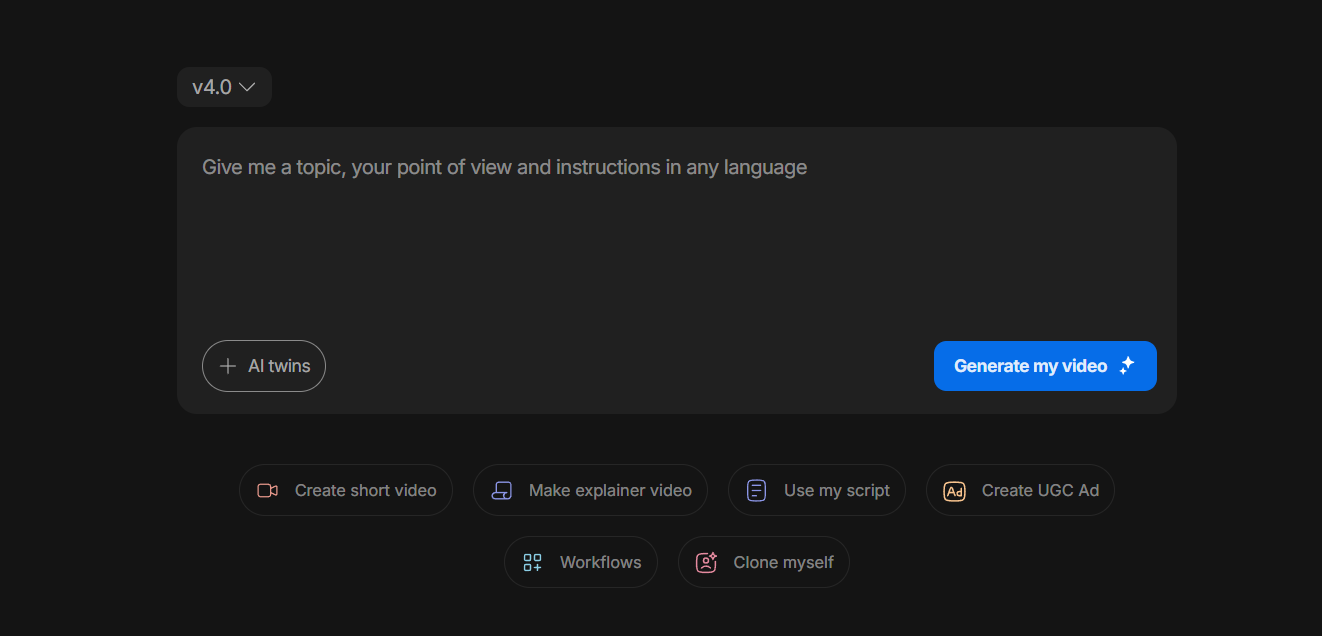
Invideo AI operates on a simple yet incredibly powerful premise: text-to-video generation. The process is astonishingly straightforward:
- Give it a Prompt: You start with a simple text prompt describing your video idea. For example, “Create a 1-minute YouTube Short about the most mysterious places on Earth.”
- AI Gets to Work: Invideo’s AI analyzes your prompt. It writes a complete script, searches a massive library of millions of premium stock video clips (from sources like iStock and Storyblocks) to find relevant visuals for every scene, generates a realistic AI voiceover, and selects appropriate background music.
- Get a Complete Draft: In just a few minutes, you are presented with a fully-formed video draft. The script is there, the visuals are synced, the voiceover is timed perfectly, and captions are automatically added.
- Edit with Simple Commands: From here, you can make changes using simple text commands. Don’t like a clip? Type “change this clip to a drone shot of a forest.” Want to shorten a scene? Just delete the corresponding sentence from the script. It’s a completely new, conversational way to edit.

Key Features: More Than Just a Video Generator
While the core text-to-video feature is the star, Invideo AI is packed with capabilities that make it a comprehensive content creation tool.
Create “Faceless” YouTube Channels at Scale
The trend of “cash cow” or faceless YouTube channels is booming, but the production is still time-intensive. Invideo AI is the ultimate tool for this niche. You can generate dozens of high-quality, monetizable videos on topics like history, finance, or meditation without ever showing your face or using your own voice. The AI handles the scripting, visuals, and voiceover, allowing you to scale your channel’s output exponentially.
Massive Premium Stock Media Library
A major highlight in this Invideo AI review is the integrated media library. You get access to over 16 million royalty-free assets from top-tier providers like iStock by Getty Images. A subscription to iStock alone can cost hundreds of dollars per month. Having this library fully integrated and automatically utilized by the AI provides immense value and ensures your videos look polished and professional, not cheap or generic.
Realistic, Human-Sounding AI Voices
Forget the robotic, monotone voices of early AI. Invideo AI features a range of incredibly realistic, human-sounding voices with different accents and styles. You can generate a clear, professional voiceover for your script in seconds, saving you the time and expense of recording it yourself or hiring a voice actor.
Who Is Invideo AI For?
Invideo AI is a perfect fit for anyone who wants to create more video content, faster.
- Aspiring YouTubers: Launch that faceless channel you’ve been dreaming of. Produce content consistently without burning out on editing.
- Marketers & Agencies: Generate high-quality video ads, social media content, and promotional videos for clients in a fraction of the time.
- Bloggers & Writers: Repurpose your articles into engaging videos to reach a wider audience on platforms like YouTube and TikTok.
- Solopreneurs & Coaches: Create educational content, course materials, and marketing videos without needing a dedicated video production team.
Final Verdict: The Future of Fast, Scalable Video
After conducting this Invideo AI review, it’s impossible not to be impressed. This tool represents a true leap forward in content creation. It democratizes video production, making it possible for anyone with a good idea to create a professional-looking video, regardless of their technical skills or budget. The ability to generate a complete video draft from a single prompt is a revolutionary time-saver.
If you’re looking to scale your video output, automate your workflow, and finally get all those video ideas out of your head and onto the screen, Invideo AI isn’t just a good option—it’s the future.
Experience the power of AI video generation for yourself.
What If You Could Create a Viral Video While You Sleep?
This isn’t science fiction. Our hands-on Invideo AI review explores the revolutionary tool that turns a single sentence into a fully scripted, edited, and voiced video in minutes.
The “No Time to Create” Epidemic
You have incredible ideas for videos. You see the success of faceless YouTube channels, viral TikToks, and engaging social media ads, and you know you could do it too… if only you had the time. The reality is that creating a single video is a monumental task. You have to research, write a script, find visuals, record a voiceover, search for music, and then spend hours editing it all together. The sheer amount of work is a barrier that stops most aspiring creators before they even start.
But what if AI could do 90% of that work for you? What if you could simply provide an idea, and a sophisticated AI would act as your scriptwriter, video editor, and voice artist, delivering a near-complete video in minutes? This is the promise of Invideo AI, a groundbreaking AI video generator that is poised to completely disrupt the content creation landscape. In this detailed Invideo AI review, we put that promise to the test.
How Does Invideo AI Actually Work?
Invideo AI operates on a simple yet incredibly powerful premise: text-to-video generation. The process is astonishingly straightforward:
- Give it a Prompt: You start with a simple text prompt describing your video idea. For example, “Create a 1-minute YouTube Short about the most mysterious places on Earth.”
- AI Gets to Work: Invideo’s AI analyzes your prompt. It writes a complete script, searches a massive library of millions of premium stock video clips (from sources like iStock and Storyblocks) to find relevant visuals for every scene, generates a realistic AI voiceover, and selects appropriate background music.
- Get a Complete Draft: In just a few minutes, you are presented with a fully-formed video draft. The script is there, the visuals are synced, the voiceover is timed perfectly, and captions are automatically added.
- Edit with Simple Commands: From here, you can make changes using simple text commands. Don’t like a clip? Type “change this clip to a drone shot of a forest.” Want to shorten a scene? Just delete the corresponding sentence from the script. It’s a completely new, conversational way to edit.
Key Features: More Than Just a Video Generator
While the core text-to-video feature is the star, Invideo AI is packed with capabilities that make it a comprehensive content creation tool.
Create “Faceless” YouTube Channels at Scale
The trend of “cash cow” or faceless YouTube channels is booming, but the production is still time-intensive. Invideo AI is the ultimate tool for this niche. You can generate dozens of high-quality, monetizable videos on topics like history, finance, or meditation without ever showing your face or using your own voice. The AI handles the scripting, visuals, and voiceover, allowing you to scale your channel’s output exponentially.
Massive Premium Stock Media Library
A major highlight in this Invideo AI review is the integrated media library. You get access to over 16 million royalty-free assets from top-tier providers like iStock by Getty Images. A subscription to iStock alone can cost hundreds of dollars per month. Having this library fully integrated and automatically utilized by the AI provides immense value and ensures your videos look polished and professional, not cheap or generic.
Realistic, Human-Sounding AI Voices
Forget the robotic, monotone voices of early AI. Invideo AI features a range of incredibly realistic, human-sounding voices with different accents and styles. You can generate a clear, professional voiceover for your script in seconds, saving you the time and expense of recording it yourself or hiring a voice actor.
Who Is Invideo AI For?
Invideo AI is a perfect fit for anyone who wants to create more video content, faster.
- Aspiring YouTubers: Launch that faceless channel you’ve been dreaming of. Produce content consistently without burning out on editing.
- Marketers & Agencies: Generate high-quality video ads, social media content, and promotional videos for clients in a fraction of the time.
- Bloggers & Writers: Repurpose your articles into engaging videos to reach a wider audience on platforms like YouTube and TikTok.
- Solopreneurs & Coaches: Create educational content, course materials, and marketing videos without needing a dedicated video production team.
Final Verdict: The Future of Fast, Scalable Video
After conducting this Invideo AI review, it’s impossible not to be impressed. This tool represents a true leap forward in content creation. It democratizes video production, making it possible for anyone with a good idea to create a professional-looking video, regardless of their technical skills or budget. The ability to generate a complete video draft from a single prompt is a revolutionary time-saver.
If you’re looking to scale your video output, automate your workflow, and finally get all those video ideas out of your head and onto the screen, Invideo AI isn’t just a good option—it’s the future.
Experience the power of AI video generation for yourself.
What If You Could Create a Viral Video While You Sleep?
This isn’t science fiction. Our hands-on Invideo AI review explores the revolutionary tool that turns a single sentence into a fully scripted, edited, and voiced video in minutes.
The “No Time to Create” Epidemic
You have incredible ideas for videos. You see the success of faceless YouTube channels, viral TikToks, and engaging social media ads, and you know you could do it too… if only you had the time. The reality is that creating a single video is a monumental task. You have to research, write a script, find visuals, record a voiceover, search for music, and then spend hours editing it all together. The sheer amount of work is a barrier that stops most aspiring creators before they even start.
But what if AI could do 90% of that work for you? What if you could simply provide an idea, and a sophisticated AI would act as your scriptwriter, video editor, and voice artist, delivering a near-complete video in minutes? This is the promise of Invideo AI, a groundbreaking AI video generator that is poised to completely disrupt the content creation landscape. In this detailed Invideo AI review, we put that promise to the test.
How Does Invideo AI Actually Work?
Invideo AI operates on a simple yet incredibly powerful premise: text-to-video generation. The process is astonishingly straightforward:
- Give it a Prompt: You start with a simple text prompt describing your video idea. For example, “Create a 1-minute YouTube Short about the most mysterious places on Earth.”
- AI Gets to Work: Invideo’s AI analyzes your prompt. It writes a complete script, searches a massive library of millions of premium stock video clips (from sources like iStock and Storyblocks) to find relevant visuals for every scene, generates a realistic AI voiceover, and selects appropriate background music.
- Get a Complete Draft: In just a few minutes, you are presented with a fully-formed video draft. The script is there, the visuals are synced, the voiceover is timed perfectly, and captions are automatically added.
- Edit with Simple Commands: From here, you can make changes using simple text commands. Don’t like a clip? Type “change this clip to a drone shot of a forest.” Want to shorten a scene? Just delete the corresponding sentence from the script. It’s a completely new, conversational way to edit.
Key Features: More Than Just a Video Generator
While the core text-to-video feature is the star, Invideo AI is packed with capabilities that make it a comprehensive content creation tool.
Create “Faceless” YouTube Channels at Scale
The trend of “cash cow” or faceless YouTube channels is booming, but the production is still time-intensive. Invideo AI is the ultimate tool for this niche. You can generate dozens of high-quality, monetizable videos on topics like history, finance, or meditation without ever showing your face or using your own voice. The AI handles the scripting, visuals, and voiceover, allowing you to scale your channel’s output exponentially.
Massive Premium Stock Media Library
A major highlight in this Invideo AI review is the integrated media library. You get access to over 16 million royalty-free assets from top-tier providers like iStock by Getty Images. A subscription to iStock alone can cost hundreds of dollars per month. Having this library fully integrated and automatically utilized by the AI provides immense value and ensures your videos look polished and professional, not cheap or generic.
Realistic, Human-Sounding AI Voices
Forget the robotic, monotone voices of early AI. Invideo AI features a range of incredibly realistic, human-sounding voices with different accents and styles. You can generate a clear, professional voiceover for your script in seconds, saving you the time and expense of recording it yourself or hiring a voice actor.
Who Is Invideo AI For?
Invideo AI is a perfect fit for anyone who wants to create more video content, faster.
- Aspiring YouTubers: Launch that faceless channel you’ve been dreaming of. Produce content consistently without burning out on editing.
- Marketers & Agencies: Generate high-quality video ads, social media content, and promotional videos for clients in a fraction of the time.
- Bloggers & Writers: Repurpose your articles into engaging videos to reach a wider audience on platforms like YouTube and TikTok.
- Solopreneurs & Coaches: Create educational content, course materials, and marketing videos without needing a dedicated video production team.
Final Verdict: The Future of Fast, Scalable Video
After conducting this Invideo AI review, it’s impossible not to be impressed. This tool represents a true leap forward in content creation. It democratizes video production, making it possible for anyone with a good idea to create a professional-looking video, regardless of their technical skills or budget. The ability to generate a complete video draft from a single prompt is a revolutionary time-saver.
If you’re looking to scale your video output, automate your workflow, and finally get all those video ideas out of your head and onto the screen, Invideo AI isn’t just a good option—it’s the future.
Experience the power of AI video generation for yourself.